Automated emails are set up once and then forgotten. Two years on, the welcome email still carries last Christmas's code, the basket email links to a product that's gone, and nobody remembers who approved any of it. Automations is a register that keeps them in view.
One page per automation
- What it is: its kind, what starts it and what makes people leave (written in words, never a list of people), its markets and languages, its email platform, its status (draft, building, live, paused or retired) and its owner.
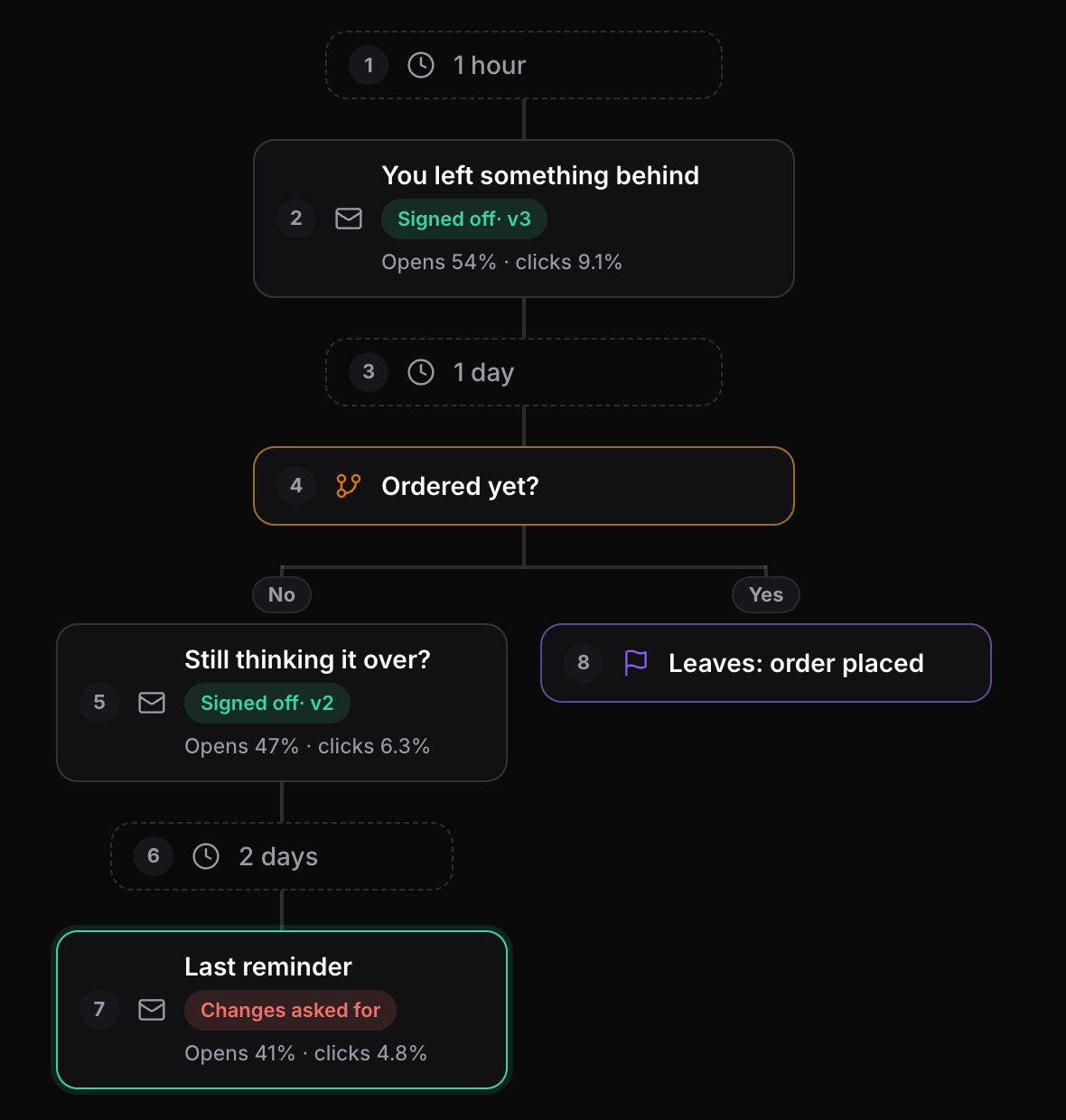
- The journey: emails, waits, splits and goals, drawn as a flow. Start from a typical map for the kind, or turn an existing journey map into an automation. Waits add up, so the list shows "3 emails over 9 days".
- Each email's sign-off: every email step shows whether it's signed off, in sign-off or has changes asked for, with the version. Send a step for sign-off from the page.
Checked while it runs
- Landing pages: Mailfois reads every page an email links to and compares it with what the email says (discount, price, code, end date, stock). Live automations are re-checked every week and the owner is told when a page no longer matches. It never opens tracked or unsubscribe links.
- Reviews: each automation is due a review every few months (six unless you change it). The owner, or the whole team, is reminded when it falls due, and can add the review to their calendar.
- Results per step: type in each email's totals for a period from your platform's report, and the journey shows how each step performs.
A register you can print
The printable register lists every automation with its status, owner, emails and when it was last reviewed: the page to bring to a quarterly review, or to hand a new starter. Every change is kept in History.
Your email platform still runs it
Mailfois never connects to your email platform, never stores a log-in for it and never sees who is in a programme. You type in what each automation does, and results are totals for a period, never who opened or clicked.
Why I built it this way
Automated emails go stale more easily than campaigns, because once they're live nobody has a reason to open them again. These are the choices I made, and why.
- Typed in, never connected. I could have built an importer for each email platform, but that means holding a log-in to your platform and seeing who is in each programme. Mailfois never does either, so you describe each automation in words and add its emails by preview link.
- A review date on everything. Every automation is due a review six months after it was last reviewed, unless you change it, because "set and forget" is how a welcome email ends up carrying last Christmas's code.
- Landing pages checked by rules, not guesses. The weekly check reads each linked page and compares the discount, price, code, end date and stock with what the email says. It never opens tracked links or unsubscribe links, so it can't skew your click figures or unsubscribe anyone.
- Results as totals. You type in each email's figures for a period from your platform's report. There's no per-person data, on purpose.
How I check it works: the demo shop's lights page says 20% off while one of its emails says 25%, on purpose, so I can see the landing page check catch it every time.
Pricing
The Free plan includes 1 automation; paid plans have no limit. See the pricing page.
Questions
Does Mailfois connect to Klaviyo, Braze or my ESP?
No. You type in what each automation does and add its emails by preview link or from your Library. Your email platform keeps running the automation.
What kinds of automation can I keep track of?
Any: welcome and onboarding series, abandoned basket or browse, post-purchase, replenishment, winback, birthday, renewal, order and delivery emails, and lifecycle programmes.
How are reviews reminded?
When a live or paused automation is due a review, its owner (or everyone in the workspace, if you choose) gets a reminder in Mailfois and in the daily reminders email, then every two weeks until it is reviewed.
How many automations can I add?
The Free plan includes 1 automation. Paid plans have no limit.

Liam Kane is an email and marketing automation specialist with over ten years in marketing and seven in email, planning and building campaigns on Marketo, Bloomreach and Silverpop. He built Mailfois, so read this with that in mind. More about Liam.