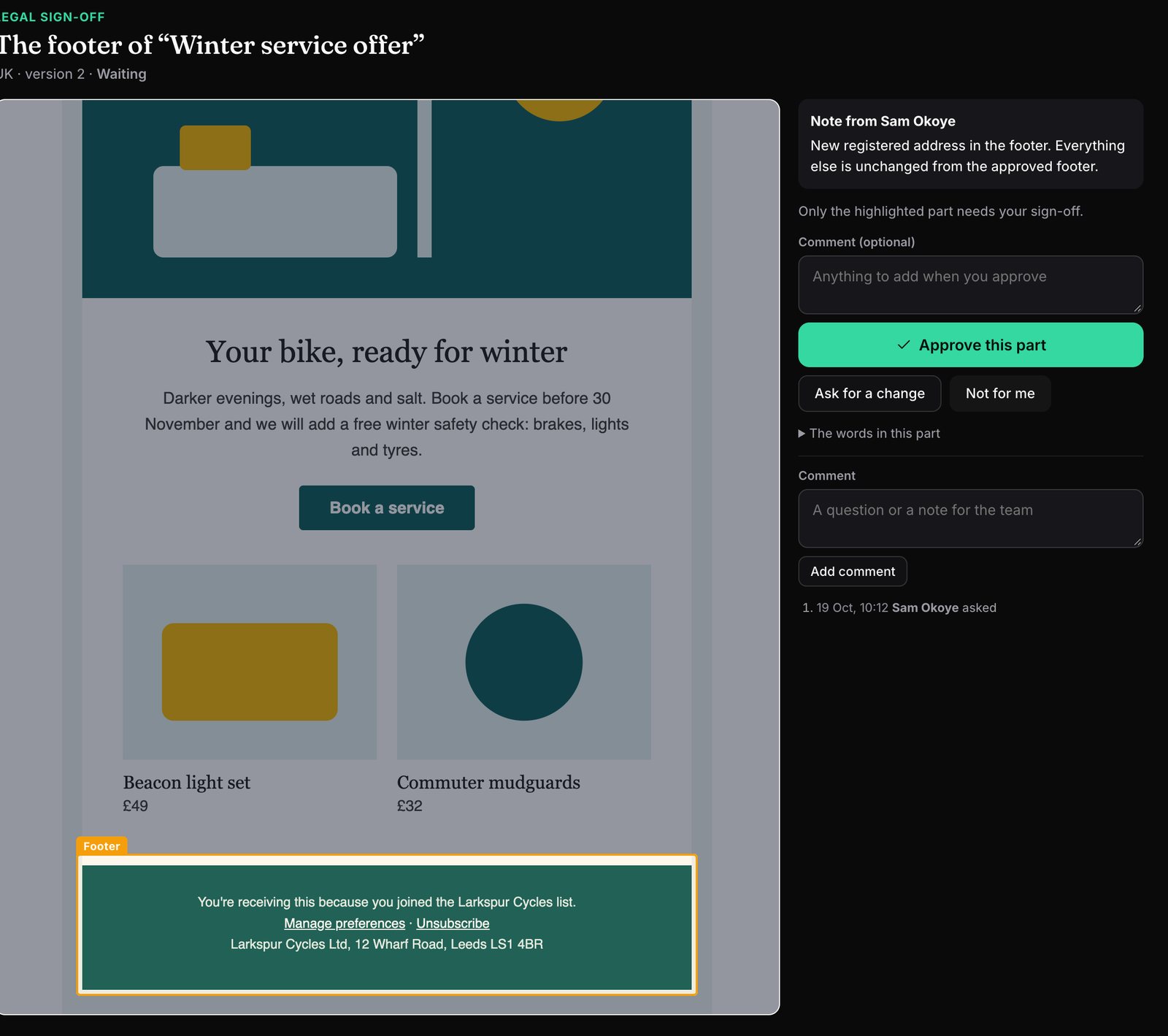
Most marketing emails need more than one yes. The campaign manager approves the email, but Legal has to approve the footer, Pricing the offer, and someone in each market their language. Today that usually means a screenshot in a chat, a "looks fine" by email, and no record of which version anyone saw.
Ask for sign-off on just their part
- Mark the part. Drag a box around it, click a section, or highlight the exact words. Mailfois shows the words inside so you know you've got the right bit.
- Ask the right person. Pick an approver type (Legal, Compliance, Brand, Pricing, Accessibility, Data protection, or a reviewer for a market) and add a note: new prize draw terms, end date changed to 30 April.
- They decide. They see the email with their part outlined and the rest dimmed, and approve it, ask for a change, or say it's not for them. People outside your team get a private link and need no account.
The email waits for them
- While a part is waiting, has a change asked for, or was approved on an older version, the email can't be approved. Sign-off says who it's waiting for.
- Outside approvers see it too: an email with a part still waiting says With Legal first.
- An owner or admin can approve anyway, with a reason (Legal approved it by phone). The reason is kept in the approval record.
- When a new version keeps the approved words, the approval carries over. If the words changed, the part goes back to the same person, showing what changed.
Approved wording, remembered
When Legal approves a footer, a consent line or a set of terms, Mailfois keeps the exact words with who approved them, when, the language and the markets. Next time an email contains those words, Sign-off says they're already approved and you can record the part as covered without asking again. If the words are close but different (a new date, a changed company name), it shows exactly what changed.
- Brand Guard warns when an email's footer isn't one of your approved footers, and when approved wording is past its review date.
- Studio has an Approved wording panel, so mock-ups start with the right footer.
- Translators see which lines are approved wording, so they keep the meaning exact.
Ask automatically
Rules ask the specialist for you, so nobody has to remember: every email in the Competition category goes to Legal; any email mentioning a prize draw or alcohol goes to Legal; a footer that isn't approved wording goes to Legal; an email with a price or discount goes to Pricing; each market's reviewer gets the emails going to their market. Reminders go out if a part is still waiting after two days.
A record you can show
Every part keeps a trail: who asked, the note, each decision and comment, and which version it was on. Decisions appear in the printable approval record and in History, and can post to Teams or Slack.
What it records, and what it doesn't
Mailfois records approval of the wording in your emails. It never holds your subscriber lists or proof of anyone's permission to contact them: that stays in your email platform. For the rules themselves, see our guides to email law in the UK, US, Canada, Australia and New Zealand.
Why I built it this way
I've planned and built email campaigns for seven years, and the parts that need a specialist are always the same: the footer, the terms, the offer, the translated version. These are the choices I made, and why.
- The email waits, with no exceptions you can't see. If a part is waiting, the email can't be approved. I kept one way past it, because "Legal said yes on a call" is real life: an owner or admin can approve anyway, but only by writing down why, and that reason sits in the approval record next to the part it skipped.
- Approval follows the words, not the layout. When a new version comes in, Mailfois checks whether the exact approved words are still there. Restyling the footer or moving it doesn't send it back to Legal; changing a date or an address does, and they see exactly what changed.
- Outside specialists don't need an account. Most legal and compliance people will never log in to an email tool, so they get a private link to their part only. A reminder sends a fresh link and the old one stops working.
- It records wording, not consent. I decided Mailfois would never hold subscriber lists, so it doesn't store anyone's permission to be emailed either. It records who approved which words, on which version, and when.
How I check it works: every rule above (the gate, approvals carrying over, links for outside specialists, rules that ask automatically) has its own database test, run against a made-up shop called Larkspur Cycles, which is the shop in the screenshot.
Pricing
Specialist sign-off is on every plan, including Free. The approved wording library comes with the Team and Agency plans. See the pricing page.
Questions
Does the specialist need a Mailfois account?
No. People outside your team get a private link by email that opens their part of the email. People in your team see their requests in Mailfois.
Can several people sign off different parts of one email?
Yes. Ask Legal about the footer, Pricing about the offer and each market reviewer about their language, all on the same email.
What happens when the email changes?
Mailfois checks each approved part against the new version. If the approved words are still there, the approval carries over; if they changed, the part goes back to the same person, showing what changed.
Is this legal advice?
No. Mailfois records who approved which words and when. Your Legal or Compliance team decides what the words should be.

Liam Kane is an email and marketing automation specialist with over ten years in marketing and seven in email, planning and building campaigns on Marketo, Bloomreach and Silverpop. He built Mailfois, so read this with that in mind. More about Liam.