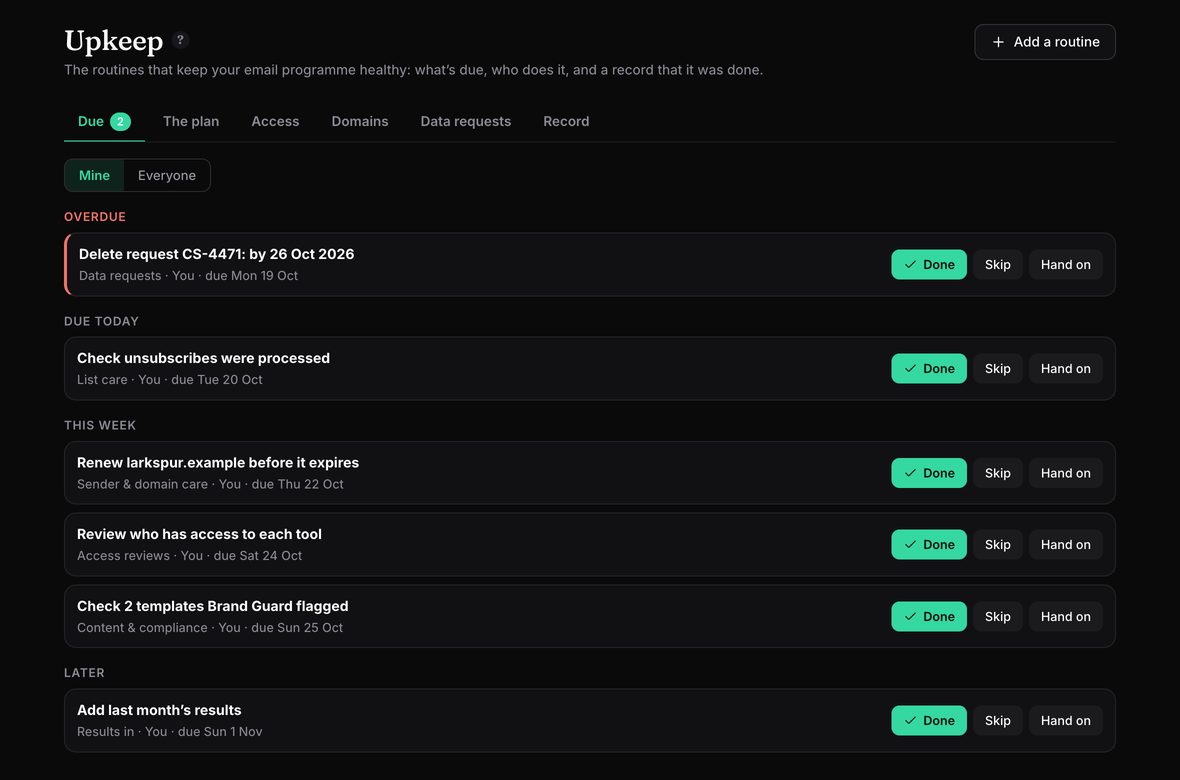
List hygiene is nobody’s job until something breaks. A complaint rate creeps up, a domain lapses over a bank holiday, someone who left still has a log-in to the email platform, or a request to delete someone’s data sits in a shared inbox past its deadline. Each of these is a small job. The trouble is that they come round on their own schedule, and they depend on someone remembering.
Upkeep turns them into routines. Each one has an owner (and, if you want, a checker or a rota), comes round on its own, reminds the right person, and is ticked off with a note. The record builds itself.
What it keeps on top of
- List care: check unsubscribes were processed, suppress hard bounces, keep an eye on the spam complaint rate, sunset inactive subscribers, and audit consent. Routines are suggested for the markets you send to.
- Sender and domain care: your sending domains are read every week from public records: when the domain and the BIMI certificate expire, DKIM keys, how far DMARC has got towards enforcement, and any DNS change since last week. Renewals and changes become jobs for the domain’s owner.
- Access reviews: a register of who has a log-in to which tool (names and levels, never passwords), reviewed every quarter. When someone leaves the workspace, each tool’s admin gets a job to remove them; freelancers can have an end date.
- Content and compliance: your team templates are run through Brand Guard every month, and a job appears when one gets worse. Yearly reviews of accessibility, footers and legal wording, and the rules for your markets.
- Data requests: log a request to delete, see, correct or stop using someone’s data by your own reference. Mailfois works out the deadline for where the person is (the UK, Ireland and the EU, California, Canada, Australia or New Zealand), makes a job with the steps, and records whether it was done on time.
- Results in: a nudge when a send has no results yet, so reports and client hubs tell the whole story.
Who does what, and proof that it was done
- Each job has an owner. Or a rota that takes turns, or a checker who confirms it before it counts as done. Anyone can hand a job on with a note.
- It comes to them. Jobs show in My work, the daily reminders email and the Monday “Your week” email, and can go to a Teams or Slack channel. Late jobs go to the workspace owners after a week.
- Ticking it off keeps the record. Done, skipped (with a reason) or checked, with who, when, a note and a count such as “37 bounces suppressed”. Print the record or download it as a spreadsheet.
Jobs can also show on the campaign calendar, so a list clean-up or a domain renewal doesn’t land unnoticed in the week of a big send.
Your list never leaves your email platform
Mailfois never imports, holds or cleans your subscriber list, and never connects to your email platform. Each routine says what to do there. Notes can’t hold email addresses or phone numbers, and data requests are kept by reference only.
Why I built it this way
Campaigns get attention because they have a send date. The jobs around them don’t, so they drift: bounce handling that quietly stops working, a domain renewal on an old card, a log-in nobody removed. These are the choices I made, and why.
- An owner for every job. “The team” doesn’t do anything. A routine without an owner shows up as a problem until someone takes it.
- A record, not a checklist. Ticking a box is easy to forget. A dated record of who did what is what a data protection officer, an auditor or a client actually asks for.
- Grouped by job, never ranked by person. The point is that nothing falls through the gaps, not to compare people.
- No list, ever. I could have built list cleaning into Mailfois, but that means holding your subscribers’ details. Mailfois never does, so the work stays in your platform and Mailfois keeps the rhythm and the record.
Pricing
Upkeep is included on every plan, Free included. See the pricing page.
Questions
Does Mailfois clean my email list?
No. Mailfois never holds or imports your subscriber list. Each routine says what to do in your own email platform (for example, suppress hard bounces or sunset people who haven’t opened in a year), reminds whoever’s turn it is, and keeps the record when they tick it off.
Which jobs can Upkeep keep track of?
Starter routines cover list care (unsubscribes, bounces, complaints, inactive subscribers, consent), sending domains (renewals, the BIMI certificate, DKIM and DMARC), access reviews, template checks, data requests and getting results in. You can add your own for anything else that comes round.
How does it handle data requests?
Log a request to delete, see, correct or stop using someone’s data by your own reference number. Mailfois works out the deadline for where the person is, makes a job for it with the steps, and records when it was done and whether it was on time. It never holds the person’s name or address.
Can I show the record to an auditor or a client?
Yes. The record lists every time each job was done, checked or skipped, with who, when and any note. Print it, or download it as a spreadsheet; data requests have their own download with whether each was on time.

Liam Kane is an email and marketing automation specialist with over ten years in marketing and seven in email, planning and building campaigns on Marketo, Bloomreach and Silverpop. He built Mailfois, so read this with that in mind. More about Liam.